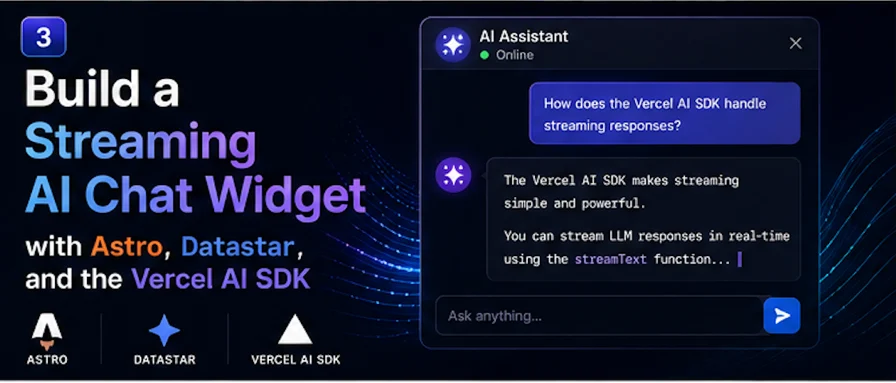
This is the post the whole series was building toward. We've got the streaming primitive and we've shipped a summarize button. Now let's build the thing everyone actually wants: a real, multi-turn AI chat widget, with messages streaming in live.
This is exactly the use case the Vercel AI SDK's useChat hook exists for — and exactly the one it won't help you with, because useChat only ships for React, Vue, and Svelte. So we'll build it the Datastar way. And the Datastar way turns out to be cleaner, because it leans on a principle that fits chat perfectly: the server owns the conversation, and the DOM is just the view.
The mental shift
In a React chat app, the message list is client state. You keep an array in a useState, append to it, re-render. The client is the source of truth and the server is a function it calls.
Datastar inverts that. The conversation lives on the server. The browser just displays whatever HTML the server patches in. When you send a message, the server appends your bubble, streams the assistant's reply into a fresh bubble, and remembers the whole exchange for next time. The client holds almost no state — just the text in the input box.
This is less code and fewer bugs, because there's no client/server sync to get wrong. There's only one copy of the conversation, and it's on the server.
Server-side conversation state
For the tutorial I'll keep conversations in a simple in-memory Map, keyed by a session id. In production you'd back this with a real store — Redis, a database, or Astro's built-in sessions — but the shape is identical.
import type { ModelMessage } from "ai";
const conversations = new Map<string, ModelMessage[]>();
export function getConversation(id: string): ModelMessage[] {
if (!conversations.has(id)) conversations.set(id, []);
return conversations.get(id)!;
}
Each conversation is just an array of messages in the AI SDK's ModelMessage shape ({ role, content }) — which means we can hand it straight to the model with no translation.
The chat endpoint
Here's the heart of it. It reuses the datastarResponse helper from post one.
import type { APIRoute } from "astro";
import { streamText } from "ai";
import { openai } from "@ai-sdk/openai";
import { datastarResponse } from "../../lib/datastar";
import { getConversation } from "../../lib/conversations";
export const maxDuration = 30;
export const POST: APIRoute = async ({ request }) => {
const body = await request.json();
const sessionId = body?.sessionId ?? "anon";
const message = (body?.message ?? "").trim();
return datastarResponse(async ({ patchElements, patchSignals, close }) => {
if (!message) return close();
const history = getConversation(sessionId);
history.push({ role: "user", content: message });
patchElements(bubble("user", message));
patchSignals({ message: "", thinking: true });
const replyId = `msg-${Date.now()}`;
patchElements(
`<div id="messages" data-append><div id="${replyId}" class="bubble assistant"></div></div>`
);
const result = streamText({
model: openai("gpt-5.5"),
system: "You are a concise, friendly assistant.",
messages: history,
abortSignal: request.signal,
});
let reply = "";
for await (const chunk of result.textStream) {
reply += chunk;
patchElements(
`<div id="${replyId}" class="bubble assistant">${escapeHtml(reply)}</div>`
);
}
history.push({ role: "assistant", content: reply });
patchSignals({ thinking: false });
close();
});
};
function bubble(role: "user" | "assistant", text: string) {
return `<div id="messages" data-append><div class="bubble ${role}">${escapeHtml(
text
)}</div></div>`;
}
function escapeHtml(s: string) {
return s.replace(/&/g, "&").replace(/</g, "<").replace(/>/g, ">");
}
There are two Datastar techniques doing the heavy lifting here, worth slowing down on.
Appending vs. replacing. Most of the time Datastar morphs an element by matching its id — send <div id="output">…</div> and it replaces the matching element. But for a chat log we want to add bubbles, not replace the list. That's what the data-append attribute on the #messages container does: it tells Datastar to append the inner content rather than overwrite. So each user message and each new assistant bubble gets appended to the growing conversation.
Streaming into a specific bubble. When the assistant's reply starts, we first append one empty bubble with a unique id (msg-${Date.now()}). Then, as tokens arrive, we re-send that specific bubble by its id — which Datastar morphs in place. So the new bubble fills in live while every earlier message sits untouched above it. The unique id is what lets us target just the latest reply.
The widget
The front end is, once again, just HTML. The only client state is the input text and a couple of UI flags.
---
// src/components/ChatWidget.astro
import { randomUUID } from "node:crypto";
const sessionId = randomUUID(); // one conversation per page load
---
<div
  class="chat"
  data-signals={`{message: '', thinking: false, sessionId: '${sessionId}'}`}
>
  <div id="messages" class="messages"></div>

  <form
    class="composer"
    data-on:submit="@post('/api/chat'); $message = ''"
  >
    <input
      data-bind:message
      placeholder="Type a message..."
      data-attr:disabled="$thinking"
      autocomplete="off"
    />
    <button type="submit" data-attr:disabled="$thinking || !$message">
      Send
    </button>
  </form>

  <div class="status" data-show="$thinking">Assistant is typing...</div>
</div>
A few things worth pointing out:
- `sessionId` is generated server-side at render and tucked into a signal, so every request carries it and the endpoint knows which conversation to continue. One conversation per page load here; persist the id in a cookie if you want it to survive refreshes.
- `data-on:submit` on the form fires the post and clears the input optimistically. Because the form is handled by Datastar, there's no full-page submit — and no need for
event.preventDefault(), Datastar handles that. - All the signals get sent automatically.
message and sessionId ride along in the request body, which is why the endpoint just reads body.message and body.sessionId. - The input and button disable while `$thinking`, so you can't fire two messages into the same turn.
A little CSS to make it feel real
.messages { display: flex; flex-direction: column; gap: 0.5rem; }
.bubble { padding: 0.6rem 0.9rem; border-radius: 1rem; max-width: 75%; }
.bubble.user { align-self: flex-end; background: #2563eb; color: white; }
.bubble.assistant { align-self: flex-start; background: #f1f5f9; }
.composer { display: flex; gap: 0.5rem; margin-top: 1rem; }
.composer input { flex: 1; }
What you end up with
Type a message, hit send. Your bubble pops onto the right immediately. "Assistant is typing..." appears, an empty bubble opens on the left, and the reply writes itself into it word by word. Send another message and the whole thing continues — because the server kept the history, the model has full context for the follow-up.
No useChat. No React. No client-side message array, no re-render logic, no sync bugs. Just a server that owns the conversation and a UI that displays whatever it's told to. The entire client is HTML with attributes.
Taking it further
A few natural next steps, all of which stay within the same pattern:
- Persistence. Swap the in-memory
Map for Redis or a database keyed by a cookie session, and conversations survive restarts and refreshes. Astro 6's built-in sessions are a clean fit here. - Markdown rendering. Run the assistant's accumulated text through a markdown renderer before patching (escaping first), so code blocks and lists render properly. Re-rendering the whole bubble each token is fine — Datastar morphs only what changed.
- Stop button. Since the endpoint already passes
request.signal to streamText, wiring a stop button that aborts the fetch will halt generation and stop your token meter. - Tool calls. This is where the AI SDK v6
Agent abstraction comes in — give the model tools, and stream not just text but tool-call status into the chat. That's its own post, and it's the natural sequel to this one.
That's the series: a primitive, a feature, and a full app, all built on the same fifteen-line idea. The Vercel AI SDK never needed to ship a Datastar binding — because once you see that its text stream and Datastar's SSE protocol are two ends of the same pipe, you just connect them and get out of the way.