In the last post I built the one pattern that powers every AI feature in this stack: loop over the Vercel AI SDK's text stream on the server, re-emit each chunk as a Datastar SSE event, watch the answer appear live with no client-side framework.
Now let's turn it into something you'd actually ship. A "summarize this page" button is a great first real feature — it's genuinely useful on a long article or doc, it's small enough to build in one sitting, and it shows off the pattern handling real-world content instead of a toy prompt.
The whole thing is about twenty lines on top of what we already have.
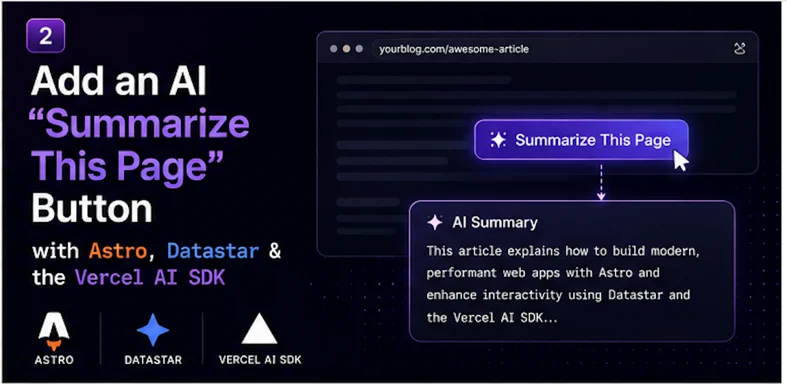
The plan
- A button on the page fires a Datastar action and sends the current URL.
- The server fetches that URL, strips it down to readable text, and hands it to the model with a "summarize this" instruction.
- The summary streams back into a panel, token by token.
The reason we send the URL and re-fetch it server-side, rather than scraping the DOM, is that it keeps the button drop-in simple — it works on any page without knowing anything about that page's structure — and it keeps the potentially-large page content out of the request body. If your content already lives in an Astro content collection, you can skip the fetch entirely and read it locally; I'll note where.
The button
This reuses the datastarResponse helper from the first post. The page side is tiny:
---
// drop this into any layout or page
---
<div data-signals="{summary: '', summarizing: false}">
  <button
    data-on:click="@post('/api/summarize', {contentType: 'form', body: {url: window.location.href}})"
    data-attr:disabled="$summarizing"
  >
    <span data-show="!$summarizing">✨ Summarize this page</span>
    <span data-show="$summarizing">Summarizing...</span>
  </button>

  <div
    id="summary-panel"
    data-show="$summary || $summarizing"
    class="summary-panel"
  >
    <div id="summary"></div>
  </div>
</div>
A note on passing the URL: the simplest robust approach is to send it explicitly. You can also set it into a signal on load with data-init and let Datastar serialize it automatically — but passing it inline in the action keeps everything visible in one place. Either works.
The panel stays hidden until there's something to show (data-show="$summary || $summarizing"), then reveals itself the moment the request fires.
The endpoint
Here's where the work happens. Fetch, strip, summarize, stream.
import type { APIRoute } from "astro";
import { streamText } from "ai";
import { openai } from "@ai-sdk/openai";
import { datastarResponse } from "../../lib/datastar";
export const maxDuration = 30;
export const POST: APIRoute = async ({ request }) => {
const form = await request.formData();
const url = String(form.get("url") ?? "");
return datastarResponse(async ({ patchElements, patchSignals, close }) => {
patchSignals({ summarizing: true });
const html = await fetch(url).then((r) => r.text());
const text = htmlToText(html).slice(0, 12000);
const result = streamText({
model: openai("gpt-5.5"),
system:
"You summarize web pages for a busy reader. Return 3-5 tight bullet " +
"points capturing the key takeaways. No preamble.",
prompt: `Summarize this page:\n\n${text}`,
abortSignal: request.signal,
});
let summary = "";
for await (const chunk of result.textStream) {
summary += chunk;
patchElements(`<div id="summary">${render(summary)}</div>`);
}
patchSignals({ summarizing: false });
close();
});
};
function htmlToText(html: string) {
return html
.replace(/<script[\s\S]*?<\/script>/gi, "")
.replace(/<style[\s\S]*?<\/style>/gi, "")
.replace(/<[^>]+>/g, " ")
.replace(/\s+/g, " ")
.trim();
}
function render(md: string) {
const escaped = md
.replace(/&/g, "&")
.replace(/</g, "<")
.replace(/>/g, ">");
const items = escaped
.split("\n")
.filter((l) => l.trim().startsWith("- "))
.map((l) => `<li>${l.replace(/^\s*-\s*/, "")}</li>`)
.join("");
return items ? `<ul>${items}</ul>` : escaped;
}
Walk through what changed from the bare primitive:
- We read `formData` instead of JSON, because the button posted with
{contentType: 'form'}. That's a Datastar option that sends a normal form body instead of serializing signals — handy when you just want to pass one explicit value. - We fetch and strip the page.
htmlToText is deliberately crude — strip scripts and styles, drop the tags, collapse whitespace. For a summary, the model doesn't need clean markup, it needs the words. The .slice(0, 12000) keeps a giant page from blowing up your token bill; tune it to taste. - We give the model a system prompt so the output is consistent: a few tight bullets, no "Here is a summary of the page" preamble.
- We render bullets as we stream. The
render helper escapes the text (still untrusted!) and converts the model's - lines into real <li> elements, so the summary looks like a list instead of raw dashes. Because we re-send the whole #summary element each token and Datastar morphs it, the list grows cleanly.
If your content is local
If you're adding this to your own Astro blog and the page content lives in a content collection, don't fetch your own URL over HTTP — that's wasteful. Pass the slug instead and read it directly:
import { getEntry } from "astro:content";
const entry = await getEntry("blog", slug);
const text = entry?.body ?? "";
Markdown is actually better input than stripped HTML — it's already clean text with structure the model can read. If you have the source, use it.
The result
Drop the button on a long article and click it. The panel slides open, "Summarizing..." appears, and a few seconds later a tidy bullet list writes itself into the page, one point at a time. No page reload, no spinner library, no client framework — just a server loop and Datastar morphing HTML as it arrives.
It's a small thing, but it's a real thing, and it's the same four-step shape from the first post: action fires, server streams from the model, tokens become SSE events, Datastar paints them in.
Next up, the big one: a full streaming chat widget, where we keep a conversation going across turns and let the server own the history — the most Datastar-idiomatic way to build a chatbot.