In the last post we built a streaming chat widget where the server owns the conversation and Datastar paints the messages. It works, but the assistant can only talk. It can't do anything — can't check the weather, hit an API, look something up. Let's fix that.
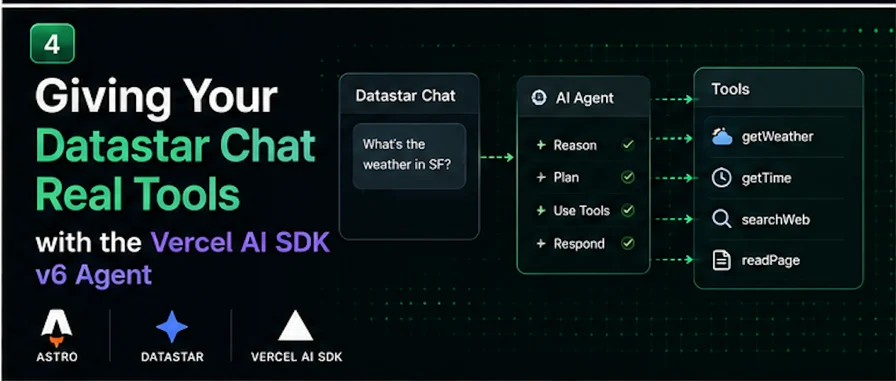
The Vercel AI SDK v6 made agents a first-class abstraction with the ToolLoopAgent class: you hand it a model, some instructions, and a set of tools, and it runs the loop — call the model, execute any tools it asks for, feed the results back, repeat until it has an answer. Our job is to wire that loop into the Datastar chat and, the fun part, stream the tool-call activity into the conversation as it happens so the user can watch the agent work.
This builds directly on the previous two posts — the datastarResponse helper from post one and the conversation store and chat UI from post three. If you skipped those, grab those two pieces first.
Defining some tools
A tool is a function the model can choose to call, described well enough that the model knows when to reach for it. Let's give our agent two real, keyless ones: current weather (via Open-Meteo, which needs no API key) and the current time.
import { tool } from "ai";
import { z } from "zod";
export const getWeather = tool({
description:
"Get the current weather for a city. Use when the user asks about " +
"weather, temperature, or conditions somewhere.",
inputSchema: z.object({
city: z.string().describe("City name, e.g. 'Penticton' or 'Tokyo'"),
}),
execute: async ({ city }, { abortSignal }) => {
const geo = await fetch(
`https://geocoding-api.open-meteo.com/v1/search?name=${encodeURIComponent(
city
)}&count=1`,
{ signal: abortSignal }
).then((r) => r.json());
const place = geo?.results?.[0];
if (!place) return { error: `Couldn't find a place called ${city}` };
const wx = await fetch(
`https://api.open-meteo.com/v1/forecast?latitude=${place.latitude}` +
`&longitude=${place.longitude}¤t=temperature_2m,wind_speed_10m`,
{ signal: abortSignal }
).then((r) => r.json());
return {
city: place.name,
country: place.country,
temperatureC: wx?.current?.temperature_2m,
windKph: wx?.current?.wind_speed_10m,
};
},
});
export const getCurrentTime = tool({
description: "Get the current date and time. Use when asked what time or day it is.",
inputSchema: z.object({}),
execute: async () => ({ now: new Date().toISOString() }),
});
Two details that trip people up. The schema field is `inputSchema`, not parameters — the AI SDK renamed it in v5 to line up with the Model Context Protocol, and v6 keeps the name. And the description is written for the model: phrase it as a trigger condition ("use when the user asks about weather") rather than a mechanism ("calls the Open-Meteo API"). The model reads that description to decide when to call the tool, and better descriptions measurably improve tool-call accuracy.
The agent
Now define the agent itself. This can live module-level and be reused across requests — that's the whole point of the ToolLoopAgent abstraction.
import { ToolLoopAgent, stepCountIs } from "ai";
import { openai } from "@ai-sdk/openai";
import { getWeather, getCurrentTime } from "./tools";
export const assistant = new ToolLoopAgent({
model: openai("gpt-5.5"),
instructions:
"You are a concise, friendly assistant. Use your tools when they'd help " +
"answer accurately. Don't guess at weather or time — look them up.",
tools: { getWeather, getCurrentTime },
stopWhen: stepCountIs(5),
});
That stopWhen: stepCountIs(5) matters. A tool-augmented agent loops — model, tool, model, tool — and without a stop condition a confused model can loop until it's burned a fortune in tokens. Five rounds is a sensible ceiling for a chat assistant; bump it for genuinely autonomous tasks. (The default is 20 if you omit it.)
Streaming the loop into the chat
Here's the upgraded endpoint. The shape is the same as the plain chat endpoint, but instead of iterating textStream, we iterate `fullStream` — because fullStream surfaces not just text but the tool calls and results too, which is exactly the activity we want to show.
import type { APIRoute } from "astro";
import { datastarResponse } from "../../lib/datastar";
import { getConversation } from "../../lib/conversations";
import { assistant } from "../../lib/agent";
export const maxDuration = 60;
export const POST: APIRoute = async ({ request }) => {
const body = await request.json();
const sessionId = body?.sessionId ?? "anon";
const message = (body?.message ?? "").trim();
return datastarResponse(async ({ patchElements, patchSignals, close }) => {
if (!message) return close();
const history = getConversation(sessionId);
history.push({ role: "user", content: message });
patchElements(bubble("user", message));
patchSignals({ message: "", thinking: true });
const replyId = `msg-${Date.now()}`;
patchElements(
`<div id="messages" data-append><div id="${replyId}" class="bubble assistant"></div></div>`
);
const result = assistant.stream({ messages: history });
let reply = "";
for await (const part of result.fullStream) {
switch (part.type) {
case "tool-call":
patchElements(
`<div id="messages" data-append>` +
`<div class="tool-chip" id="tool-${part.toolCallId}">` +
`🔧 ${labelFor(part.toolName)}…</div></div>`
);
break;
case "tool-result":
patchElements(
`<div id="tool-${part.toolCallId}" class="tool-chip done">` +
`✅ ${labelFor(part.toolName)}</div>`
);
break;
case "text-delta":
reply += part.text;
patchElements(
`<div id="${replyId}" class="bubble assistant">${escapeHtml(reply)}</div>`
);
break;
}
}
history.push({ role: "assistant", content: reply });
patchSignals({ thinking: false });
close();
});
};
function labelFor(toolName: string) {
return (
{ getWeather: "Checking the weather", getCurrentTime: "Checking the time" }[
toolName
] ?? `Running ${toolName}`
);
}
function bubble(role: "user" | "assistant", text: string) {
return `<div id="messages" data-append><div class="bubble ${role}">${escapeHtml(
text
)}</div></div>`;
}
function escapeHtml(s: string) {
return s.replace(/&/g, "&").replace(/</g, "<").replace(/>/g, ">");
}
Walk through the fullStream loop, because that's the whole new idea:
- `tool-call` fires when the agent decides to use a tool. We append a status chip — "🔧 Checking the weather…" — with an id tied to the tool call, so the user sees why there's a pause instead of staring at a dead UI.
- `tool-result` fires when the tool finishes. We re-patch that same chip by its id (Datastar morphs it in place) to a done state. The conversation now shows a little audit trail of what the agent actually did.
- `text-delta` is the same token streaming as before — accumulate into the reply and morph the bubble.
Because every patch targets an element by id, and the chips and the reply bubble all have distinct ids, they update independently inside the growing message list. The user watches the agent think, act, and answer, live.
A tiny bit of CSS for the chips
.tool-chip {
  align-self: flex-start;
  font-size: 0.85rem;
  color: #64748b;
  background: #f8fafc;
  border: 1px solid #e2e8f0;
  border-radius: 0.5rem;
  padding: 0.25rem 0.6rem;
}
.tool-chip.done { color: #16a34a; }
The chat UI from the previous post doesn't change at all — same form, same signals. All the new behavior lives in the endpoint, which is the recurring theme of this whole series: the server does the work, the HTML just displays it.
What you've got now
Ask it "what's the weather in Tokyo right now?" and you'll see your message appear, then "🔧 Checking the weather…", then "✅", then a natural-language answer streaming in with the real temperature. Ask a follow-up — "is that warmer than Penticton?" — and because the server kept the history, the agent has the context to call the tool again and compare.
That's a real agent, in a real UI, with no React and no client-side agent framework. The ToolLoopAgent runs the reasoning loop on the server; fullStream exposes every step; Datastar paints each step as it happens.
Where to take it
- More tools. Web search, your own database, a calculator, an internal API — each is just another
tool() with a good description. The agent figures out when to use them. - Human-in-the-loop approval. v6 added a
needsApproval flag on tools so the agent pauses before sensitive actions and waits for a yes. In Datastar terms: stream an approve/deny button into the chat, and resume on click. That's a great standalone post. - Subagents. Wrap one agent's
generate() inside a tool and a parent agent can delegate to it — the AI SDK's pattern for multi-agent systems, all still streamable into the same chat. - Observability. The
onStepFinish callback hands you each step's tool calls, results, and token usage — pipe that to your logs for a per-step audit trail when you inevitably ask "why did it do that?"
Next in the series we leave chat behind and stream structured data — watch a form or a set of cards fill themselves in field by field as the model generates them, using streamText with output (the v6 replacement for streamObject).