QA'ing a website is important when shipping new features. I've worked in companies that had massive QA teams pouring over new features, but with agents doing more and more work, I now have a dedicated agent whose job is to QA features.
For example, I've been building a dialer in my off hours for my girlfriend's cold calling business, and QA is especially important here — if the call flow breaks, she finds out mid-call with a prospect on the line.
The setup is simple: Claude Code (or Codex) does the testing, and Agent Browser is the browser it drives. I used to point my agents at Playwright CLI for this, but recently switched them to Agent Browser.
Installing Agent Browser
npm install -g agent-browser
agent-browser install
Then install the agent-browser skill, so Claude Code knows how to use it:
npx skills add vercel-labs/agent-browser
The skill drops the full agent-browser playbook into your agent's context — the commands, the snapshot-then-ref workflow, when to screenshot vs. pull console logs — so it drives the browser well from the first run instead of feeling its way around.
That's about the only time you'll run anything by hand. From here on, the agent runs it.
Why I switched the agents off Playwright CLI
Agent Browser was built for exactly this: an AI agent driving a browser from the command line.
The big one is context efficiency. When Claude Code looks at a page, it runs snapshot, which returns a compact accessibility tree where every element gets a ref like @e1, @e2:
agent-browser open example.com
agent-browser snapshot -i
agent-browser click @e2
That snapshot is ~200-400 tokens. A full DOM dump is 3,000-5,000. When the agent is walking a multi-step call flow, that difference is the gap between an agent that finishes the run and one that runs out of context halfway through.
And when something breaks mid-run, the agent has everything it needs to investigate on its own:
agent-browser screenshot fail.png
agent-browser console
agent-browser errors
agent-browser network requests --status 400-499
No "can you check the console for me" — it checks the console.
Just ask the agent
With the skill installed, you can skip straight to asking:
Use agent-browser to test the login flow.
Even without the skill, most agents can figure it out if you add "run agent-browser --help to see available commands" — the help output is comprehensive. The skill just saves the agent from rediscovering the workflow every session.
How I QA the dialer
Here's the actual test run for the dialer, end to end.
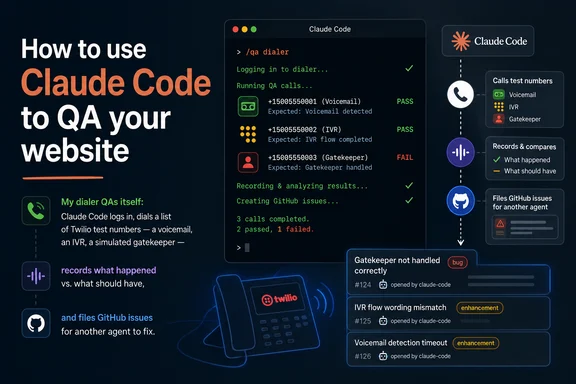
First, the setup that makes it work: a "Test" call list wired to a set of Twilio numbers we control, where each number behaves differently on purpose. One goes straight to voicemail. One answers with an IVR menu. One plays a simulated gatekeeper. Because the agent knows what should happen on each call, it can judge what did happen — that's the difference between a smoke test and an actual QA pass.
One guardrail here is non-negotiable: the QA agent only ever dials the Test list — numbers we own, behaviors we scripted. It never gets pointed at a real lead list. These are real calls going out over Twilio, and nobody wants an AI cold-calling actual prospects because a selector moved.
Then the whole run is one message to Claude Code:
Use agent-browser. Log in to the staging site, go to the Dialer section, select the "Test" list, and hit Dial.
>
The list calls our Twilio test numbers — one is a voicemail, one is an IVR, one is a simulated gatekeeper. For each call, record the outcome: what the dialer detected, what state it ended in, and whether that matches what the number is supposed to do.
>
If anything goes wrong — wrong call state, console error, broken layout, a call that never resolves — capture:
>
- A screenshot of what you see
- The console logs
- What you expected vs. what actually happened
>
When the run is done, create a GitHub issue for each failure with all of that attached.
Claude opens the browser, logs in, drives the dial session, and watches each call resolve. The voicemail number should land in the voicemail flow, the IVR should be detected as a menu, the gatekeeper should route to the talk track. Anything off-script gets a screenshot, the console output, and an expected-vs-actual writeup — all captured by the agent, mid-run.
From failure to filed issue
Failures don't land in my lap — Claude files them straight into the repo with the gh CLI (already authed on my machine, so there's nothing extra to wire up). A typical issue looks like this:
Title: QA: IVR call ends in "connected" state instead of "ivr-detected"
Labels: qa-bot

**Expected:** Dialer detects the IVR menu and flags the call as IVR.
**Actual:** Call sat in "connected" for 45s, then logged as a completed conversation.

**Console:**
TypeError: Cannot read properties of undefined (reading 'digits') — ivr-detect.ts:84

**Screenshot:** call-2-ivr.png (attached)
**Repro:** Test list, call 2 of 3, staging build 2f41c9a
Then the QA bot does the part I like most: it assigns the ticket to the coder agent and instructs it to take it on. The coder agent reads the issue — screenshot, console error, repro steps all right there — and drafts the fix. By the time I'm involved, I'm reviewing a PR, not chasing a bug report.
The pass kicks off two ways: automatically whenever a change is deployed to staging — so the fix that closes one issue can't quietly break another flow — and on a scheduled morning cron job, so every day starts with a clean run before any real calls get made.
The thing that makes this all work is that Claude isn't describing a browser, it's driving one. It picks a command, agent-browser runs it for real, and whatever the page does next becomes Claude's next input. When it decides to hit Dial, the actual button gets clicked and actual calls go out to actual Twilio numbers.
Production errors file issues too
The QA pass catches breakage before it ships. Sentry catches whatever slips through anyway.
The wiring is the same shape as the QA bot. Sentry watches the production dialer, and when a new error fires — an actual new exception, not noise — an alert rule opens a GitHub issue through Sentry's GitHub integration. The issue lands in the repo with the stack trace, breadcrumbs, affected release, and how many sessions hit it.
From there the loop is identical: the issue gets labeled sentry, assigned to the coder agent, and the coder agent is instructed to take it on. It reads the stack trace, tracks the error down in the codebase, and drafts the fix — and because the QA pass runs on every staging deploy, that fix gets walked through the call flows before it ships back out.
That's the part I've come to appreciate: QA failures and production errors land in the same queue, in the same format, handled by the same agent. Whether a selector moved on staging or an exception fired on a live call, what reaches me is a PR with the evidence attached.
Put the process in CLAUDE.md
Typing that prompt once is fine. Typing it every time is the old job with extra steps.
The fix is to write the testing process into your repo's CLAUDE.md (or AGENTS.md for Codex and friends), so any agent that touches the codebase already knows how to QA it. Mine looks roughly like this:
## QA process

After any change to the call flow, run the dialer QA pass:

1. Use agent-browser. Log in with the `staging` auth profile.
2. Go to the Dialer section, select the "Test" list, hit Dial.
   Only ever dial the Test list — never a real lead list.
3. The Test list calls our Twilio test numbers. Expected behavior:
   - Voicemail number — dialer detects voicemail, logs the call, advances to the next lead
   - IVR number — dialer detects the menu and flags it as an IVR
   - Gatekeeper number — dialer routes to the gatekeeper talk track
4. For each call, record outcome vs. expected.
5. On any failure (wrong call state, console error, broken layout,
   call that never resolves): capture a screenshot, console logs,
   and expected-vs-actual.
6. File a GitHub issue per failure using the `gh` CLI, labeled `qa-bot`,
   with everything attached. Assign it to the coder agent and instruct
   it to take the issue on.
Two things happen once this lives in the repo. "QA the dialer" becomes the entire prompt. And agents start running the pass on their own — finish a feature, check CLAUDE.md, verify their own work before telling me it's done.
It also puts your expected behavior in version control, next to the code it describes. When the IVR handling changes, the QA definition changes in the same PR.
Beyond the test list
The same move covers most of what a QA pass used to be — each one is just a different instruction to the agent:
Morning regression sweep. "Walk the three core flows and screenshot each step." Visual regressions surface before a customer files them. Mine is the cron job above — it runs before I'm at my desk.
Debugging flaky e2e tests. "This test is failing in CI — run it with the browser visible and tell me why." The agent works out whether the selector moved, the timing is off, or the feature is genuinely broken — instead of you staring at a CI log guessing.
Mobile checks. Add one line to the prompt: "Re-run the pass emulating an iPhone 14." The agent handles it with agent-browser set device — no device lab.
Logins without credentials in prompts. This is the one piece you do set up by hand, once. Save a staging auth profile:
echo "$STAGING_PASS" | agent-browser auth save staging --url https://staging.my-dialer.com/login --username roger --password-stdin
After that, the instruction is just "log in with the staging auth profile" — the password never appears in a prompt, a CLAUDE.md, or the agent's context.
Where it falls short
The basic test pass runs in about 10 minutes and earns its keep: failures arrive as GitHub issues with screenshots, and obvious breakage gets caught before anyone hits it.
What it can't do is guess your business logic. The agent doesn't know whether that confirmation modal is a bug or a feature, or that the call timer is supposed to keep running when the tab loses focus. You still have to encode that judgment — the Twilio test numbers and the CLAUDE.md entry are exactly that: expected behavior, written down where the agent can check against it. A real QA instinct gets built out beside the agent, one corrected assumption at a time.
But compared to clicking the same call flow for the hundredth time? I'll take writing the sentence.