
Customizing my Xteink X4 Pro: CrossPoint firmware and wallpapers
How I set up my Xteink X4 Pro e-reader: CrossPoint Reader firmware flashed from the browser, custom sleep-screen wallpapers, and books and PDFs over Wi-Fi.
Read more Roger Stringer
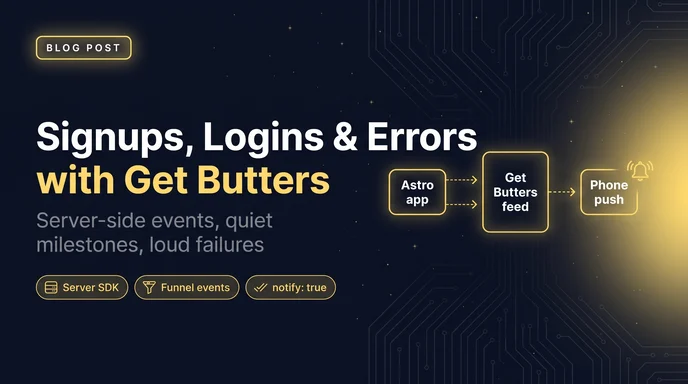
I wanted a feed of what Talk To My Sites was doing. Not a funnel builder, not session replay. Just a stream: someone signed up, a site finished indexing, a crawl failed.
That's what Get Butters is for, so I pointed Talk To My Sites at it. One project, server-side events, and my phone only buzzes when something actually matters.
This is the setup: a small server helper, the events that fire today, how I identify people without stuffing emails into the feed, and the pattern I use for errors, insight cards and deploys.
Talk To My Sites is an Astro app on Cloudflare Workers. Tracking happens on the server, with the Get Butters server SDK, not a script tag on the marketing site. There's no publishable pk_ key in the public HTML for talktomysites.com or app.talktomysites.com. Signups, logins and the rest are recorded after the request has already succeeded.
The helper lives in src/lib/eventz.server.ts. The filename is a leftover from before the product was called Get Butters. It wraps @getbutters/js/server, and it never throws into the request: a Butters outage must not break signup, chat or billing.
Here's the pattern:
// src/lib/eventz.server.ts
import { Butters } from "@getbutters/js/server";
import { GETBUTTERS_API_KEY } from "astro:env/server";

export const butters = new Butters({
  key: GETBUTTERS_API_KEY, // secret ev_… key, server only
  project: process.env.GETBUTTERS_PROJECT!,
});

const reportFailure = (event: string) => (err: unknown) => {
  console.error(
    JSON.stringify({
      event,
      message: err instanceof Error ? err.message : String(err),
    }),
  );
};

export const identifyUser = (
  userId: string | number,
  properties: Record<string, unknown>,
): Promise<void> =>
  butters
    .identify(String(userId), properties)
    .then(() => {}, reportFailure("butters.identify_failed"));

export const trackLogin = (userId: string | number): Promise<void> =>
  butters
    .track("login", "User signed in", {
      icon: "🔑",
      user_id: String(userId),
    })
    .then(() => {}, reportFailure("butters.login_failed"));
Use a secret ev_… key on the server, never a publishable pk_… key. The server client will refuse a publishable key anyway. Keep the key in server environment variables, with no PUBLIC_ prefix.
After a successful sign-up, two things happen, both off the request path with waitUntil, so the user isn't waiting on Butters:
identifyUser sets properties on the person, including their first-touch UTM source.signup_completed event lands in the feed, with that user id and the UTM source as a tag.After a successful sign-in, the same identify call keeps the profile current (including accounts created before I added tracking), and a login event fires with the user id. Identify only updates the profile. Butters counts daily and monthly active users from events that carry a user_id, so without the login event a sign-in never shows up as activity.
waitUntil(
  Promise.all([
    identifyUser(userId, {
      plan: "free",
      utm_source: utm?.utm_source ?? "direct",
    }),
    trackFunnel("signup_completed", {
      title: "New signup",
      userId,
      utm,
    }),
  ]),
);
A heads-up on personal data: I identify people by their user id, not by putting an email in the event title or description. If you need a unique value in the feed, hash it, or just use the id. The People list already has the profile.
Neither the signup nor the login event sets notify: true. They show up in the feed. They do not buzz my phone. If every signup did, I'd stop looking at my phone.
I don't send every widget question to Butters. That would chew through the monthly event allowance and bury the feed in chat traffic. Questions already have a home: the Talk To My Sites analytics page.
What does go to the feed are the milestones, each as its own category, attributed to the account owner and their first-touch UTM source:
signup_completedsite_created: title like Site added: example.comsite_indexed: when the first indexing run finishes, including the page countdomain_verified: DNS or meta tag, and whether it was manual or the cronwidget_installed: the first live widget session on the site, not the dashboard previewfirst_question_answered: the first real visitor question the pages could answeraccount_upgraded, plan_changed, subscription_canceledquota_reached: the site limit or the monthly question limitteammate_joinedlead_captured: a visitor left contact details on a paid plan, again not from the previewThose fire from a small funnel helper so the event names stay consistent. Failures are logged and swallowed. None of them notify, on purpose.
await trackFunnel("site_created", {
  title: "Site added: example.com",
  userId,
  utm,
  url: "https://example.com",
  metadata: { siteId, pagesQueued: 42 },
});The helper also has a logError function: category error, a 🛑 icon, and notify: true. That's the one I want on my phone, on ntfy, or in Slack.
export const logError = async ({
  title,
  error,
  url,
  user_id,
  metadata,
}: {
  title: string;
  error: string;
  url?: string;
  user_id?: string | number;
  metadata?: Record<string, unknown>;
}) => {
  await butters.track("error", title, {
    description: error,
    user_id: user_id ? String(user_id) : undefined,
    icon: "🛑",
    url,
    metadata,
    notify: true,
  });
};
Here's the pattern for a failed crawl, or any other try/catch that shouldn't break the thing it's tracking:
try {
  await recrawl(siteId);
} catch (err) {
  await logError({
    title: "Crawl failed",
    error: err instanceof Error ? err.message : String(err),
    url: `https://app.talktomysites.com/app/sites/${siteId}`,
    metadata: { siteId },
  });
  // Re-throw or handle it; tracking already happened.
}
Same rule as the original Get Butters helper: if tracking itself throws, catch it. You want the error in the feed, not a second failure in the request.
Events are things that happened. Insights are numbers I want to glance at. They upsert by title, so a cron can keep a card current without stacking duplicates.
The helper wraps butters.setInsight. The Insights docs also have incrementInsight if you'd rather add 1 than re-send a total.
export const logMetric = async (title: string, value: string | number, icon = "") => {
  await butters.setInsight(title, value, icon);
};

// Here's the pattern:
await logMetric("Sites indexed", 12, "📚");
await logMetric("Questions this week", 48, "💬");
Publishable keys can't change insights. This stays on the server, with the secret key.
A person shows up in the project's People list the first time an event carries a user_id. Identify is optional: it sets properties on that person, it doesn't create a feed event, and it doesn't count toward the monthly allowance.
I only set properties I can stand behind, and I only do it from the server. The People docs are blunt about this, and they're right: a publishable key in the browser is unverified input. Don't set a plan, a billing status, or an email from the client. If you call identify in the browser at all, keep it to cosmetic things, or turn on identity verification and sign the user id on the server.
For Talk To My Sites, identify runs on signup and login with the user id from the authenticated session. That's enough to get daily and monthly active users on the Charts page, and to open the People list filtered to who's been around.
I want every deploy in the feed, and I only want my phone to buzz when one fails. There's no GitHub Actions workflow in the Talk To My Sites repo for this yet, so this is the pattern from the Get Butters CLI, the same one I use elsewhere:
- name: Install butters
  run: |
    curl -fsSL https://raw.githubusercontent.com/freekrai/getbutters-cli/main/scripts/install.sh | bash
    echo "$HOME/.local/bin" >> "$GITHUB_PATH"

- name: Report deploy
  if: always()
  env:
    GETBUTTERS_API_KEY: ${{ secrets.GETBUTTERS_API_KEY }}
  run: |
    butters push --project ${{ vars.BUTTERS_PROJECT }} --category deploys \
      --title "Deploy ${{ job.status }}" \
      --metadata '{"sha":"${{ github.sha }}","ref":"${{ github.ref_name }}"}' \
      ${{ job.status != 'success' && '--notify' || '' }}
Green deploys quietly show up in the feed. Red ones get loud.
notify: true highlights the event and fans it out to whatever you've hooked up on the project: native push on your phone or desktop, an ntfy topic, or outgoing webhooks to Slack, Discord, or your own signed JSON endpoint.
On iPhone, Safari only delivers push if Get Butters is added to the Home Screen. A regular Safari tab won't get them.
I keep notify for errors and failed deploys. The activation events stay quiet. If I want to poke at the feed from an assistant, the MCP server at https://app.getbutters.com/mcp can list projects, read events and update insight cards, with OAuth or a secret ev_… key. Publishable keys can't connect to it.
The Talk To My Sites widget is live on getbutters.com, including the docs. Get Butters is what I use to watch Talk To My Sites: signups, logins, sites, billing, the occasional error I actually want to know about.
Each product has its own job. One answers questions from the pages. The other is a feed of what the app just did. Limits on Get Butters are per project per month: 2,500 events on the free plan, 50,000 on Base, 500,000 on Plus. That's plenty for a feed of milestones, as long as I don't send every chat message.
If you want a small event feed for an app you're already running, try Get Butters free. And if you want the other side of this setup, I wrote up how to add the Talk To My Sites widget to an EmDash site, using this one as the example.
How I set up my Xteink X4 Pro e-reader: CrossPoint Reader firmware flashed from the browser, custom sleep-screen wallpapers, and books and PDFs over Wi-Fi.
Read more
How I added a Talk To My Sites chat widget to rogerstringer.com, an EmDash site: one component in the Astro layout, lead capture, the questions dashboard, and Turnstile.
Read more
The open-source Convex backend on one Fly Machine with a volume, the dashboard on a second app, and your functions deployed with the regular convex CLI.
Read more