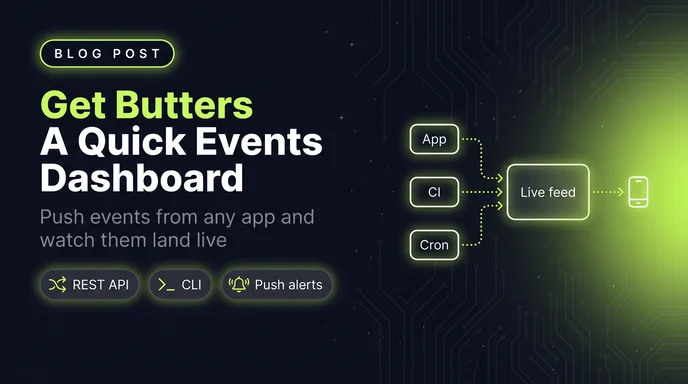
I wanted a simple dashboard that showed me events as they happened. Not analytics. Not a funnel builder. Just a feed: someone signed up, a post went live, a build finished. So I wrote a quick little Astro app to do exactly that.
Then I kept building on it. A second project. Charts. A CLI so my scripts could talk to it. Somewhere in there it stopped being a weekend toy, and that's when Get Butters was born.
Why another event tracker?
Most event tools I've tried want to be everything. They want your product analytics, your session replays, your A/B tests, your whole data warehouse. That's fine if you need all of it. I didn't.
I wanted two things. Tell me what's happening across my projects right now. And ping my phone when something actually matters.
So Get Butters is small on purpose. It isn't as feature heavy as the big event trackers, and that's fine by me. It has what counts, and more is on the way.
What it does today
- Real-time feed. Events land in a chronological stream with search, category filters, favorites and auto-refresh.
- Multi-project. Every app gets its own project, with its own feed, charts, insights and settings.
- Insights. KPI cards you upsert by title. Send "Users Online" again and it updates the same card instead of stacking up a new one.
- Charts. Event frequency by category over time, filterable by date range or category.
- Playground. A built-in form for firing test events. It shows you the raw API call and hands you a snippet for your language.
- Webhooks, both ways. Incoming webhooks turn any URL call into an event, no API key needed. Outgoing webhooks send the events you care about to Slack, Discord or your own endpoint as signed JSON.
- Push notifications. Native notifications on your desktop or phone. Nothing to install.
- ntfy.sh. Route events to your own ntfy topic, with a priority from 1 to 5.
- CLI. One binary for pushing events, setting insights, and exporting or importing your data.
Your first event
Everything goes through one REST call. Grab an API key from the API page in the app, create a project, and POST:
curl -X POST https://app.getbutters.com/api/events \
  -H "Authorization: Bearer $GETBUTTERS_API_KEY" \
  -H "Content-Type: application/json" \
  -d '{
    "project": "YOUR_PROJECT_ID",
    "category": "signups",
    "title": "New signup",
    "description": "**jane@example.com** joined from the pricing page",
    "icon": "🎉",
    "notify": true
  }'
That's the whole integration. The category gets created the first time you use it, so there's no setup step for that either. The description takes **bold** and [links](https://example.com), which is handy when you want the event to point somewhere.
notify: true highlights the event and sends it out to whatever you've hooked up: push, ntfy, webhooks. Leave it off for the chatty stuff. If every event buzzes your phone, you stop looking at your phone.
From your app
In a real app I don't want fetch calls scattered everywhere, so I wrap it in a tiny helper:
type ButtersEvent = {
category: string
title: string
description?: string
icon?: string
url?: string
user_id?: string
metadata?: unknown
notify?: boolean
}
export async function track(event: ButtersEvent) {
try {
await fetch('https://app.getbutters.com/api/events', {
method: 'POST',
headers: {
Authorization: `Bearer ${process.env.GETBUTTERS_API_KEY}`,
'Content-Type': 'application/json',
},
body: JSON.stringify({ project: process.env.GETBUTTERS_PROJECT, ...event }),
})
} catch {
}
}
Then anywhere on the server:
await track({
  category: 'orders',
  title: 'Order placed',
  description: '2 items, $84.00',
  icon: '📦',
  url: 'https://mysite.com/admin/orders/1042',
  metadata: { orderId: 1042, total: 84 },
  notify: true,
})
The empty catch is deliberate. If the tracker is down, the order still goes through. You lose one feed entry, not a sale.
url is where the event title links to, so clicking it in the feed takes you straight to the order. metadata is any JSON you want to see later when you expand the event.
From the terminal
The CLI is the thing I reach for most. It's a standalone binary, so there's no runtime to install:
curl -fsSL https://raw.githubusercontent.com/freekrai/getbutters-cli/main/scripts/install.sh | bash
export GETBUTTERS_API_KEY=ev_...
butters init --name "my-blog"
butters push --project q4q8nb18qc2i --category posts \
--title "New post published" --icon "✍️" \
--link https://mysite.com/blog/hello-world
That makes it trivial to drop into shell scripts and cron jobs. A nightly backup that tells you when it fails:
#!/usr/bin/env bash
if ! ./backup.sh; then
  butters push --project q4q8nb18qc2i --category errors \
    --title "Nightly backup failed" \
    --metadata '{"job":"backup","host":"'"$(hostname)"'"}' \
    --notify
fi
Single-quote the --metadata JSON so the inner double quotes survive the shell. The CLI parses it locally before sending, so a typo fails right there instead of coming back as a 400.
In CI
Same idea in GitHub Actions. I want every deploy in the feed, but I only want my phone to buzz when one fails:
- name: Install butters
  run: |
    curl -fsSL https://raw.githubusercontent.com/freekrai/getbutters-cli/main/scripts/install.sh | bash
    echo "$HOME/.local/bin" >> "$GITHUB_PATH"

- name: Report deploy
  if: always()
  env:
    GETBUTTERS_API_KEY: ${{ secrets.GETBUTTERS_API_KEY }}
  run: |
    butters push --project ${{ vars.BUTTERS_PROJECT }} --category deploys \
      --title "Deploy ${{ job.status }}" \
      --metadata '{"sha":"${{ github.sha }}","ref":"${{ github.ref_name }}"}' \
      ${{ job.status != 'success' && '--notify' || '' }}
Green deploys quietly show up in the feed. Red ones get loud.
Insight cards
Events are things that happened. Insights are numbers you want to glance at. They upsert by title, so a cron job can keep a card current without you ever cleaning up duplicates:
butters insight --project q4q8nb18qc2i --title "Newsletter subscribers" --value 1284 --icon "📬"
butters insight --project q4q8nb18qc2i --title "24h Sales" --value '$1,449'
Quote anything with a $ in single quotes, or your shell will helpfully turn it into nothing. Over the API it's a POST /api/insight with project, title, value and an optional icon.
Your data stays yours
I didn't want to build something that traps your data. Export the whole organization to JSON whenever you like:
butters export --file "backup-$(date +%F).json"
And butters load brings a file back in. One heads-up: load only ever adds, and it creates fresh project ids every time. Load the same file twice and you'll get two copies of everything.
How I use it
I run one project per site. Blog posts going live, new sign ups, and whatever else I want to keep an eye on all flow into their own feeds. When I want the big picture, I flip between projects instead of digging through five different dashboards.
What's next
There's more coming. It's still small on purpose, and I'd rather add the right things slowly than bolt on everything at once.
If you want to try it, pricing is flat: two plans, no overages. And if there's something you'd want from a small, focused event feed, let me know.