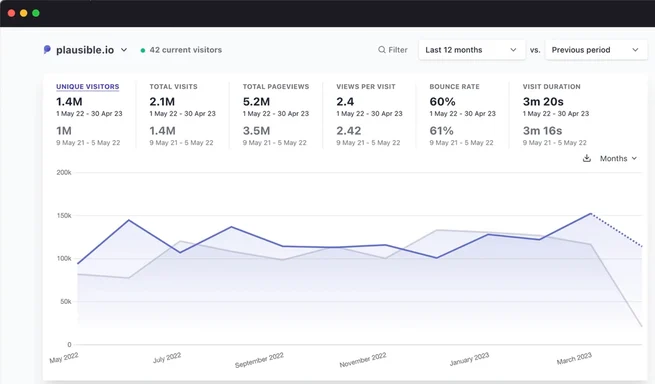
I have been using Plausible since mid-2021 and really enjoy it. Plausible is a more privacy-oriented alternative to Google Analytics and I use it for all my projects, including this site.
Adding Plausible to any site is easy with just one line of code:
Unfortunately, Plausible can be blocked by some blocklist maintainers who favor blocking every tracking code irrespective of its nature, be it good or bad.
You can find more details on Plausible's site. The main takeaway is that Plausible is a more privacy-sensitive alternative to Google Analytics, but it pays the price because of blocklist maintainers who intend to block all tracking scripts.
We could download the file from https://plausible.io/js/script.js, place it in the public folder, reference it in root.tsx, and it would work, but there are two downsides:
You might miss future script.js updates, which implies constantly downloading the script.
You'll still need to figure out how to proxy calls to https://plausible.io/api/event.
Luckily, Astro's API routes can solve this issue, as it allows us to proxy both the script and the requests to /api/event from a loader function within a route.
---
1. Script Proxying
Start by creating a file at src/pages/js/script.ts.:
Creates a loader function that fetches the script.js file from Plausible's servers and sends it back to the browser.
Extracts the file content (via await response.text();) and passes it as the new body.
Also forwards the headers and status code from the request to Plausible's servers.
2. Event Proxying
We still need to proxy calls to https://plausible.io/api/event. For this, create a route at src/pages/event/index.ts. Plausible has this URL coded in their script.js, which is why we use it in our app. Here's what should be in this file:
An action function called by script.js as a POST request. It takes the method and body from the request and performs a fetch to Plausible's servers, passing along the method, body and a Content-Type: 'application/json' header.
Upon return, it converts the reponse body to a string and creates a new response which then passes the proxied response status code, headers, and body back to our app.
This direct proxying ensures that whatever Plausible's servers return, Plausible's script will process it.
3. Referring to the Script File
To finish, update root.tsx by adding the following line inside the <head></head> tags:
Remix fetches the script file from your resource route, then grabs the script file from Plausible's server.
The script file is sent to the browser, which loads and parses it (deferred, so it doesn't halt the rest of document load).
The script file makes a request to /api/event, which is also proxied by Remix and is forwarded to Plausible's API.
---
As an added note, if you want the event route in a different location than /api/event, you can add a data-api attribute to the Plausible call. For instance, if we decide to route event at /r2d2/event: