
Running Hermes Agent and Its WebUI on One Fly.io Machine
Two config files and four commands: the Hermes gateway and its WebUI on one Fly.io Machine, sharing a volume, with each container holding only the secrets it needs.
Read more Roger Stringer
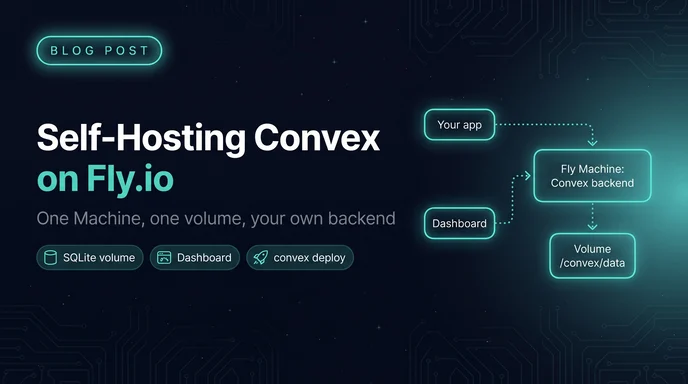
Convex is one of those tools I keep reaching for. You write queries and mutations as TypeScript functions, the client subscribes to them, and the UI updates itself when the data changes. No websocket plumbing, no cache invalidation code.
The hosted version is great. But the backend is open source, and it ships as a single Docker image. A single Docker image with a disk attached is exactly what Fly.io is good at running.
So here's how I run Convex on Fly: the backend on one Machine with a volume, the dashboard on a second app, and my app's functions deployed to it with the regular convex CLI.
There are 2 different "deploys" in this setup, and mixing them up is the first thing that'll trip you.
ghcr.io/convex/convex-backend image running on a Fly Machine. It's the database, the function runtime and the sync engine, all in one process.convex/ folder. You push it to the backend with npx convex deploy (or npx convex dev), same as you would with Convex Cloud.Fly hosts the first one. The Convex CLI handles the second.
Out of the box the backend stores everything in SQLite, with file storage on local disk. On Fly that means a volume. It also means one Machine, never two. Two Machines would each get their own volume and their own database, and your writes would split between them.
You need flyctl installed and logged in (fly auth login). Make 2 folders, one per Fly app:
mkdir -p convex-fly/backend convex-fly/dashboard
cd convex-fly/backendHere's the config I use. Swap my-convex for your own app name and pick a region close to your users:
app = 'my-convex'
primary_region = 'iad'

[build]
  # pin a specific tag here once you're past the experimenting stage
  image = 'ghcr.io/convex/convex-backend:latest'

[env]
  TMPDIR = '/convex/data/tmp'

[[mounts]]
  source = 'convex_data'
  destination = '/convex/data'

[http_service]
  internal_port = 3210
  force_https = true
  auto_stop_machines = 'stop'
  auto_start_machines = true
  min_machines_running = 1
  processes = ['app']

  [[http_service.checks]]
    interval = '5s'
    timeout = '30s'
    grace_period = '5s'
    method = 'GET'
    path = '/version'
    protocol = 'http'

[[vm]]
  memory = '1gb'
  cpu_kind = 'shared'
  cpus = 4
A few lines here are doing more work than they look like:
/convex/data is where the backend keeps its SQLite file, uploaded files and its instance secret. Mounting the volume there is what makes your data survive a deploy.TMPDIR points temp files at the volume too. The root filesystem on a Fly Machine is small, and big uploads or exports can fill it up./version is a cheap endpoint that returns 200 when the backend is up, so it makes a good health check.min_machines_running = 1 keeps the Machine awake. Convex clients hold open websockets, and a cold start in the middle of a live subscription isn't fun.fly launch --copy-config --no-deploy
fly deploy --ha=false--copy-config tells Fly to use the file you just wrote instead of generating its own. --ha=false matters: by default Fly will happily spin up 2 Machines for redundancy, and as we covered, SQLite on a volume wants exactly one.
Fly creates the convex_data volume on the first deploy (1GB by default). When it finishes you get a URL like https://my-convex.fly.dev. Open it and you should see a short message saying the backend is running. If you don't, fly logs is your friend.
The backend needs to know its own public URL so it can build links that point back at itself. Webhooks, file storage URLs and auth callbacks (if you use Convex Auth) all depend on this.
There are 2 values. The cloud origin is the API, and the site origin is where your HTTP actions live. In this setup HTTP actions are served from the same app under /http:
fly secrets set \
  CONVEX_CLOUD_ORIGIN="https://my-convex.fly.dev" \
  CONVEX_SITE_ORIGIN="https://my-convex.fly.dev/http"
Setting secrets triggers a redeploy on its own. You could put these in the [env] block of fly.toml instead, and that's fine for a solo project. I like secrets because the fly.toml can then live in a repo where every developer points at their own backend.
Inside your functions they show up as process.env.CONVEX_CLOUD_URL and process.env.CONVEX_SITE_URL.
So an HTTP action routed to /stripe-webhook gets called at:
https://my-convex.fly.dev/http/stripe-webhookThat /http prefix is the bit people forget when they paste a webhook URL into Stripe.
The CLI and the dashboard both authenticate with an admin key. The image ships a script that makes one:
fly ssh console --command "./generate_admin_key.sh"Copy the output into your password manager. You can run the script again any time to make a new one.
Now switch to your actual app. In the project root, add a .env.local:
CONVEX_SELF_HOSTED_URL='https://my-convex.fly.dev'
CONVEX_SELF_HOSTED_ADMIN_KEY='<the key from the last step>'
Keep that file out of git. Then install Convex if you haven't, and run it:
npm install convex@latest
npx convex dev
convex dev sees the self-hosted variables, pushes your convex/ folder to the Fly backend, and keeps pushing as you edit. It also writes the client URL into .env.local for your frontend (VITE_CONVEX_URL in a Vite app).
For a one-shot deploy, from CI for example:
npx convex deploy --env-file .env.productionA self-hosted backend doesn't know whether it's "dev" or "prod". It's just a backend. If you want staging and production, you run 2 Fly apps and point different env files at them. Same for preview environments. Fly apps are cheap, so this works out fine.
You'll want the dashboard for browsing tables, reading logs and running functions by hand. The fastest option runs it locally in Docker:
docker run -p 6791:6791 \
  -e NEXT_PUBLIC_DEPLOYMENT_URL="https://my-convex.fly.dev" \
  ghcr.io/convex/convex-dashboard:latest
Open http://localhost:6791 and paste the admin key.
I'd rather have it hosted, so it gets its own Fly app. In convex-fly/dashboard/fly.toml:
app = 'my-convex-dashboard'
primary_region = 'iad'

[build]
  image = 'ghcr.io/convex/convex-dashboard:latest'

[[services]]
  protocol = 'tcp'
  internal_port = 6791

  [[services.ports]]
    port = 80
    handlers = ['http']
    force_https = true

  [[services.ports]]
    port = 443
    handlers = ['tls', 'http']

[[vm]]
  memory = '1gb'
  cpu_kind = 'shared'
  cpus = 1
Then:
cd ../dashboard
fly launch --copy-config --no-deploy
fly secrets set NEXT_PUBLIC_DEPLOYMENT_URL="https://my-convex.fly.dev"
fly deploy
The dashboard is stateless. It's a Next.js app that talks to your backend, and nothing works without the admin key, so having it on a public URL doesn't hand anybody your data. You can scale it to zero when you're not using it if the bill bugs you.
The defaults get you running. They're a little thin for production.
Pin the image. :latest means a fly deploy can quietly upgrade your database engine. Pick a tag from the backend's GitHub releases and put it in [build], then upgrade on purpose.
Give it more room. The VM above is the minimum that boots comfortably. If you see slow queries or Fly throttling a shared CPU, bump the memory first:
fly scale memory 2048Watch the disk. 1GB fills up faster than you'd think once file storage gets involved. Volumes can grow (never shrink):
fly volumes list
fly volumes extend <volume-id> --size 10
Back it up. Fly takes daily volume snapshots, but I don't want my only backup to be "the hosting company has one." The Convex CLI can export everything, files included:
npx convex export --path ./backups/convex-$(date +%F).zipThat runs against whatever .env.local points at, so it works the same on a self-hosted backend. Cron it somewhere.
Use a real domain. fly certs add api.example.com, point the DNS at the app, then update both origin secrets to the new hostname. Do it before you register webhooks with anyone, because changing the origin later means re-registering all of them.
Outgrowing SQLite. The backend can also run on Postgres or MySQL. If you go that way, put the database and the backend in the same Fly region. Every Convex function call does a bunch of small reads, and cross-region latency piles up fast.
For a side project or a single-region app, I think so. You get the Convex developer experience (reactive queries, typed functions, the dashboard) on a box you control, for the price of a small Fly Machine and a volume.
What you give up is everything Convex Cloud does for you quietly: backups, upgrades, scaling past one Machine, someone else getting paged. One Machine with SQLite is a single point of failure, and you should be honest with yourself about that before a client depends on it.
My rule: prototype on Convex Cloud, self-host when there's a real reason. Data residency, cost, or wanting the whole stack on infrastructure I already run all count. "Because I can" usually doesn't, but it's still a fun afternoon.
Two config files and four commands: the Hermes gateway and its WebUI on one Fly.io Machine, sharing a volume, with each container holding only the secrets it needs.
Read more
Most sites already have the answers, buried on the right paragraph of the right page. Talk To My Sites reads your sitemap, indexes every page, and gives you one script tag so visitors can ask and get answers from your own content, with sources.
Read more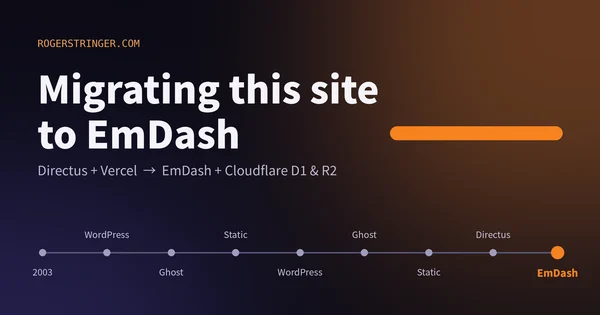
This site has changed CMS more times than I can count since 2003. This time I moved to EmDash on Cloudflare, and the reason is that most of my building now happens alongside an AI agent.
Read more